How to Find High-Intent B2B Leads on LinkedIn in 2 Minutes
The 6-step Sales Navigator system high-performing B2B teams use to surface 50+ warm leads per week — using job change signals, hiring triggers, and saved search automation that refreshes your pipeline without daily effort.
 Konnektys TeamMay 22, 2026 · 12 min read · LinkedIn Prospecting
There is a persistent belief in B2B outbound that the problem is always volume. Send more emails, make more calls, add more contacts to the sequence. More, more, more.
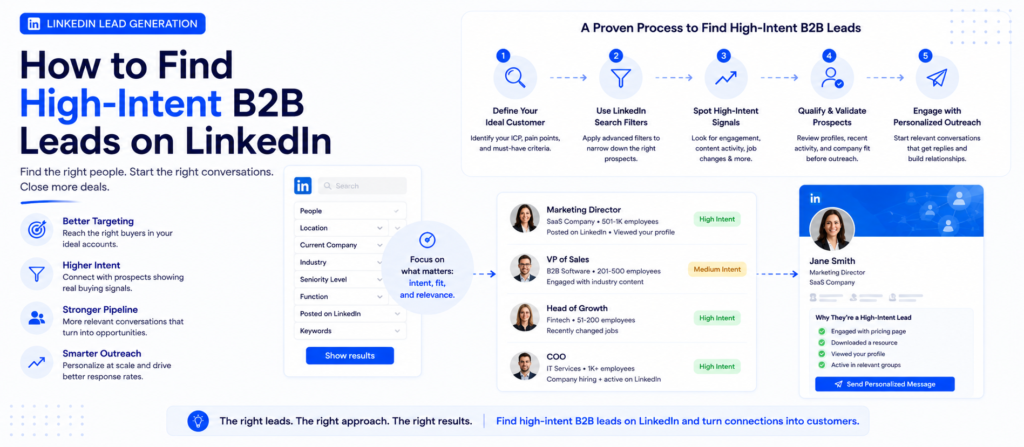
The reality is almost always the opposite. The constraint isn’t volume — it’s timing. Reaching someone the week they start a new role, the day after their company announced a funding round, or shortly after they posted publicly about a pipeline problem gets a reply. Reaching the same person six months earlier or later, when nothing is changing, gets ignored.
High-intent leads are not a personality type or a demographic filter. They are people who are currently in motion — experiencing change, pressure, or a new mandate — and therefore open to solutions they would not have considered last quarter.
What “High-Intent” Actually Means
High-intent is not a characteristic of a company. It is a characteristic of a moment. The same company that would ignore your outreach in January might be your fastest-ever close in March — because something changed.
That change is what you’re looking for. The five primary categories:
New leaders enter under pressure to show results quickly. They question existing vendor relationships and in many cases have discretionary budget available before the next planning cycle locks in. Research on B2B buyer behaviour consistently shows that new executives make a disproportionate share of vendor decisions within the first 90 days of a new role. After that window, they’ve made their decisions and shifted to execution.
A company posting aggressively for SDRs, RevOps engineers, or a VP of Sales is actively building outbound capacity — one of the most reliable signals that a company needs exactly the kind of infrastructure that surrounds outbound sales. Available publicly and updated in near-real time. Hiring intent data automates this signal monitoring across your full ICP universe.
A funding round creates budget pressure to deploy capital and demonstrate growth. Companies that have just raised Series A, B, or C are in an active evaluation window for tools and infrastructure that accelerate revenue. The window is roughly 30–90 days post-announcement. Events and buyer intent data tracks these trigger moments in real time.
Prospects who post regularly hand you specific, defensible first-line material. A cold message opening with a reference to something a prospect wrote always outperforms one opening with a generic value proposition. The “Posted on LinkedIn” filter makes this possible at the filter level, not just in individual research.
A company’s current tech stack tells you what problems they’ve already solved and what gaps remain. A company running Salesforce without a sequencing tool has a specific gap. Technographic data maps these configurations at the account level.
The Foundation You Need Before Opening Sales Navigator
Sales Navigator is a targeting tool. Its output is only as good as the clarity you bring to it. Before touching a single filter, two things need to be established:
Your ICP must be specific enough to build a list against. Not “mid-market SaaS companies” — that describes tens of thousands of companies with wildly different needs, budgets, and buying processes. A workable ICP specifies industry sub-vertical, headcount range, geography, revenue stage, tech stack context, and the specific pain that is live for your buyer persona right now. Market research and TAM analysis does this foundational work properly.
Your buyer persona must specify title, seniority, and pain — not just role. The person who buys is not always the person who uses the product. Know which conversation you are trying to initiate, and filter to the person who owns that conversation.
With those foundations in place, the six-step Sales Navigator process below runs in under two minutes per session — because the work has already been done once, properly, and saved for reuse.
Step 1 — Build Saved Personas: Stop Rebuilding Searches
The problem with most LinkedIn prospecting: every session starts with rebuilding the same filters from scratch. That wastes 15–20 minutes per prospecting session and introduces inconsistency — the filters from Tuesday’s search aren’t quite the same as Thursday’s.
Build saved personas for the two or three buyer profiles you target most often. In Sales Navigator, a saved persona stores your seniority, function, and title filters as a reusable profile. One click applies your full targeting criteria without rebuilding anything.
Example Saved Persona — B2B Outbound Agency
| Seniority | Director, VP, CXO, Owner |
| Function | Sales, Business Development, Revenue Operations |
| Industry | B2B SaaS, Professional Services |
| Company headcount | 11–200 employees |
The persona is the baseline. The intent filters in Steps 3 and 4 are what convert a standard ICP list into a high-intent prospecting queue.
What this eliminates: the generic targeting every competitor is using. Every SDR team has access to the same Apollo exports, the same Crunchbase filters, the same ZoomInfo lists. Saved personas built against a precisely defined ICP, combined with intent signals, produce a list that is structurally different from what competitors are reaching — because most of them aren’t doing this at all.
Step 2 — Dial In Your ICP Using Lead Filters
With your saved persona applied, open the full Lead Filters panel. This is where ICP precision translates into a list that is actually worth working.
| Filter | What It Does |
|---|---|
| Company headcount | Defines buying complexity, budget tier, and decision-making speed. Set based on what existing clients actually look like — not what you think you could sell to. |
| Geography | Keeps messaging regionally contextualised and SDR focus on a reachable market. Pick regions where you have existing clients, case studies, or market knowledge. |
| Seniority + function | Ensures you’re reaching decision-makers, not influencers. Know which conversation you’re initiating and filter to the person who owns it. |
| Years in current role | Underused filter. Filtering for under 18 months surfaces a disproportionate number of prospects still in evaluation mode — still questioning what the previous team set up. |
| Technologies used | Shows what tools the company currently runs and therefore what gaps exist. If you’re selling something that integrates with or replaces a specific tool, this narrows to accounts where the configuration is correct. |
| Hiring trends | Surfaces companies actively growing specific functions — a reliable proxy for budget availability and operational investment in the areas you sell to. |
Step 3 — Turn On “Changed Jobs”
The Changed Jobs filter is the single highest-ROI toggle in Sales Navigator. Apply it now — on top of the persona and lead filters already in place.
What it does: surfaces contacts who have moved into a new role within the last 90 days. These are the people most likely to be in an active evaluation window for new solutions.
Why the 90-day window matters
Week 3 of new role
Actively evaluating vendors. Questioning existing relationships. Discretionary budget available. Pressure to demonstrate value.
Month 8 of same role
Vendor decisions made. Executing an established plan. New relationships and priorities locked in. Window closed.
The combination that works: Changed Jobs filter + Years in Role under 18 months. The first catches recent movers. The second catches people still in early-tenure evaluation mode even if the LinkedIn signal has aged out. Together, they surface the full population of people likely to be in an open, evaluating mindset.
Step 4 — Add “Posted on LinkedIn” to Surface Active Prospects
Applying the “Posted on LinkedIn” filter — set to activity within the last 30 days — does two things simultaneously.
1. Removes passive accounts
A prospect who hasn’t posted or engaged on LinkedIn in months is unlikely to be actively monitoring their DMs or responding to cold outreach. The filter quietly removes a significant portion of the list who would generate low response rates regardless of message quality.
2. Generates personalisation material
Before messaging any prospect surfaced by this filter, spend 60 seconds reading their last two or three posts. They contain: problems they’re thinking about, goals they’re communicating, market positions they’re taking, and often specific language about current challenges.
A generic opener says “I thought you’d be interested in what we do.” An opener built on their post says “I read what you wrote about pipeline velocity last week and wanted to share something specific to your situation.” These get different response rates because they are different kinds of messages.
Step 5 — Don’t Overlook Warm Connections
Sales Navigator lets you filter results by relationship type — first-degree connections, mutual connections, and past colleagues. These consistently convert at higher rates than cold contacts, and most SDR teams skip them entirely in favour of cold lists.
First-degree connections Lowest Friction
An existing connection lowers friction dramatically. Reach out referencing the prior connection, or if the relationship is stronger, ask directly for a conversation rather than pitching immediately.
Mutual connections Social Proof
A shared connection is social proof before you’ve said a word. Open with the shared context — “I noticed we’re both connected to [Name]” — and let the implied credibility do the first-line work. Consistently outperforms cold openers even when the mutual connection is relatively loose.
Past colleagues Highest Response Rate
Shared professional history eliminates the cold outreach dynamic almost entirely. A short DM referencing your past overlap — at a company, an event, or in a community — gets a response at rates that cold outreach simply doesn’t achieve.
The combined population of warm contacts in your ICP — first-degree connections, mutual connections, past colleagues — is often larger than founders and SDRs expect, and almost always underworked relative to its conversion potential.
Step 6 — Save the Search and Let the Pipeline Refresh Automatically
Once your persona, lead filters, Changed Jobs toggle, and Posted on LinkedIn filter are set, hit Save Search.
Sales Navigator now monitors your exact criteria continuously and notifies you whenever new prospects qualify — new job changes, new companies entering your ICP range, new hires at target accounts, new LinkedIn activity.
Without Saved Search
45–60 minutes per manual search session. Filters rebuilt from memory. Inconsistent criteria. Same contacts surfaced repeatedly. No alerts for new matches.
With Saved Search
10–15 minutes per weekly review. Pre-filtered, intent-signalled leads ready to action. Consistent criteria. New matches automatically surfaced. Pipeline refreshes without manual effort.
Set it up properly once. The pipeline refreshes without you. Every week, more new people enter the “recently changed jobs” pool. More companies announce funding. More hiring signals emerge. The saved search captures all of it automatically.
Step 7 — What to Do With the Leads You Find
Finding high-intent leads is half the system. The other half is reaching them effectively and tracking what happens.
Verify contact details before outreach
LinkedIn’s InMail is one option, but for cold outreach at volume the primary channel is email — which requires a verified email address matched to the current role. Email finding and verification handles this. For high-priority accounts, phone number finding adds a direct dial layer.
Build the personalisation before the outreach
For every contact surfaced by Changed Jobs or Posted on LinkedIn, there is specific material available. AI-powered lead research enriches each account with signal data systematically, so the first-line hook for every outreach is grounded in something real.
Run a coordinated multi-channel sequence
LinkedIn connection request (with a short, relevant note) + direct email sequence + LinkedIn DM after connection is accepted. Cold email and LinkedIn outreach runs this coordinated sequence as a managed function.
Track everything in your CRM
Contacts who engage but don’t immediately convert need to stay in your pipeline. CRM data enrichment keeps records current. CRM cleaning removes the stale records that create noise.
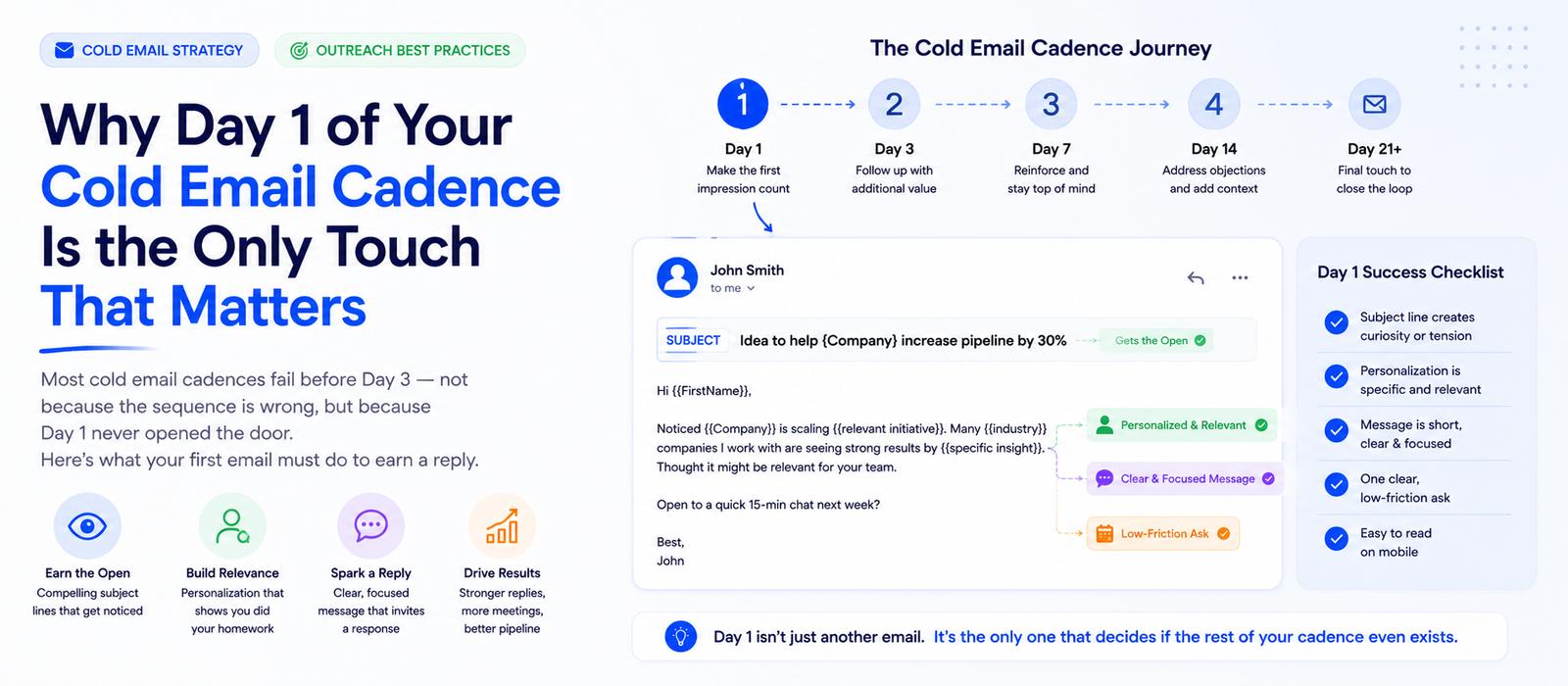
For a deep breakdown of what makes outreach convert, see our guides on why cold email gets replies and the Day 1 cold email cadence framework.
Beyond Sales Navigator: Supplementing With Additional Signal Sources
Sales Navigator is one of the best single sources of high-intent LinkedIn signals. It is not the only signal source — and relying on it exclusively misses intent data that doesn’t live inside LinkedIn’s ecosystem.
Job posting data beyond LinkedIn
LinkedIn shows a company is hiring. But job postings across Indeed, Glassdoor, and company career pages often contain more detail about exactly what gap they’re filling. Web and LinkedIn data scraping aggregates this across sources systematically.
Funding and company news
A funding announcement doesn’t always appear in Sales Navigator alerts before the 90-day window is closing. Monitoring funding databases (Crunchbase, PitchBook) and company news feeds in real time keeps outreach inside the most actionable part of the buying window.
Third-party intent data
Behavioural signals showing which companies are actively researching specific topics — product categories, competitor names, problem statements — give you buying signal that LinkedIn’s professional profile data doesn’t contain. When stacked with a job change or hiring trigger, this becomes a strong prioritisation input.
Technographic signals
Sales Navigator’s “Technologies Used” filter approximates but doesn’t fully cover a company’s technology environment. Technographic data append maps the full stack at the account level, including tools LinkedIn’s data doesn’t track.
The combination of Sales Navigator signals and external intent data is what separates a list of “recently changed jobs” contacts from a prioritised queue of accounts where multiple signals are pointing in the same direction simultaneously.
Scaling This System Beyond One Person
The six-step process above is designed to be run by one person, and it works well at that level. Scaling it — to an SDR team, to a larger ICP, to higher weekly lead volumes — requires thinking differently about each layer.
The data layer Scales through automation
A single SDR reviewing Sales Navigator alerts can process 50–100 leads per week. Above that threshold, manual review becomes the bottleneck. Contact list building and AI-powered lead research scale the data layer without a proportional increase in research time.
The outreach layer Scales through infrastructure
At 50 leads per week, manual outreach is manageable. At 500, you need sequencing software, secondary sending domains, warmed inboxes, and a rotation schedule. See our cold email infrastructure guide and domain rotation guide for the full breakdown.
The ICP layer Scales through precision
More leads processed against a vague ICP produces more wasted outreach. As you scale, the ICP definition needs to become more specific, not broader — so that a larger team working larger volumes is still reaching the right people.
When to bring in managed support Full-stack operation
Most founders and small B2B teams hit the ceiling of this system within 90–120 days of running it consistently. End-to-end B2B lead generation manages the full stack as a system that runs independently of the founder’s available hours.
For context on how signal-based LinkedIn prospecting fits into the broader AI prospecting landscape, see our AI prospecting guide for 2026.
FAQ: High-Intent LinkedIn Lead Generation Answered
What is a high-intent lead in B2B sales?
+
Is LinkedIn Sales Navigator worth it for B2B prospecting?
+
How many leads should I target per week on LinkedIn?
+
Why do job changes predict buying intent so reliably?
+
Can I use Sales Navigator to find warm leads rather than cold contacts?
+
What is the best Sales Navigator filter combination for high-intent leads?
+
What should I do after finding leads on LinkedIn Sales Navigator?
+
How do I personalise outreach to LinkedIn leads at scale?
+
How does LinkedIn prospecting fit with cold email outreach?
+
What does it cost to run a LinkedIn-based prospecting system?
+
Build the System Once. Work Warm Leads Every Week.
The insight behind the 2-minute claim is this: the two minutes are the weekly session, not the setup. The setup — persona building, filter configuration, ICP alignment, saved search creation — takes two or three hours the first time. After that, reviewing the fresh leads Sales Navigator surfaces takes under two minutes per session.
The compounding value is in the automation. Every week, more new people enter the “recently changed jobs” pool. More companies announce funding. More hiring signals emerge. More prospects post about problems you solve. The saved search captures all of it automatically and delivers it to you pre-filtered.
You don’t need 10,000 contacts. You need the right 100, at the right moment, reached with something specific to their situation. That’s what this system builds.
Need a Consistent Pipeline of High-Intent Leads from LinkedIn?
Konnektys builds and operates outbound revenue engines — from LinkedIn prospecting and AI-powered lead research to verified contact lists, email infrastructure, and fully managed cold email and LinkedIn outreach.
We’ll build and manage the entire system for you →- What “High-Intent” Actually Means
- The Foundation Before Opening Sales Navigator
- Step 1 — Build Saved Personas
- Step 2 — Dial In ICP Lead Filters
- Step 3 — Turn On “Changed Jobs”
- Step 4 — Add “Posted on LinkedIn”
- Step 5 — Warm Connections
- Step 6 — Save the Search
- Step 7 — What to Do With Leads
- Beyond Sales Navigator
- Scaling This System
- FAQ
Need a consistent pipeline of high-intent leads from LinkedIn? We’ll build and manage the entire system for you.
Talk to Konnektys →Share this article:
Related articles
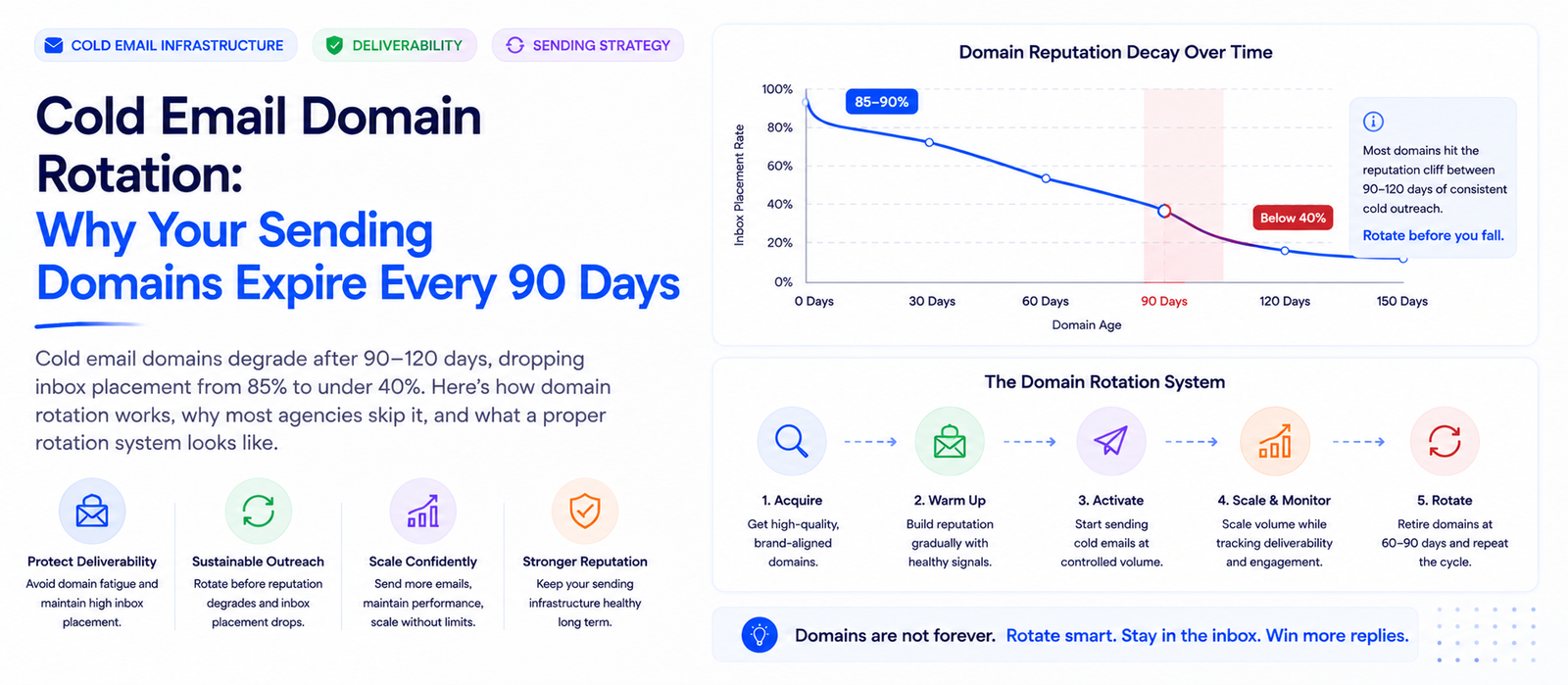
Your Cold Email Domain Has a 90-Day Shelf Life
Konnektys Team · 23 May, 2026