
Your Cold Email Domain Has a 90-Day Shelf Life — Here's What That Means for Your Pipeline
Cold email domain rotation is the infrastructure practice most agencies skip - and it's silently killing your deliverability. Every sending domain builds a "sales fingerprint" within 90-120 days. By the time inbox placement crashes, it's already too late to recover the pipeline you've burned.
 Konnektys TeamApril 28, 2026 · 9 min read · Cold Email Infrastructure
Your cold email campaign launched strong. Open rates were healthy. Replies were coming in. The pipeline was moving.
Then, around month three, something shifted. Opens dropped. Replies dried up. The same copy, the same targeting, the same sending volume — and nothing.
The problem wasn’t your messaging. It wasn’t your list. It was your infrastructure. Specifically, it was your domain.
The Deliverability Problem Nobody Warns You About
Most businesses think of email infrastructure as a one-time setup task. You buy a domain, set up DNS records, warm it up for a few weeks, and then it works. Permanently.
That’s not how it works.
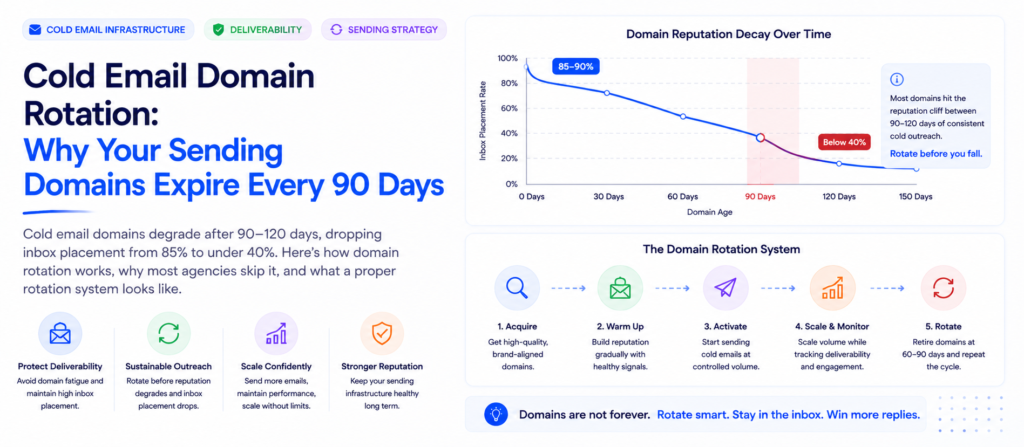
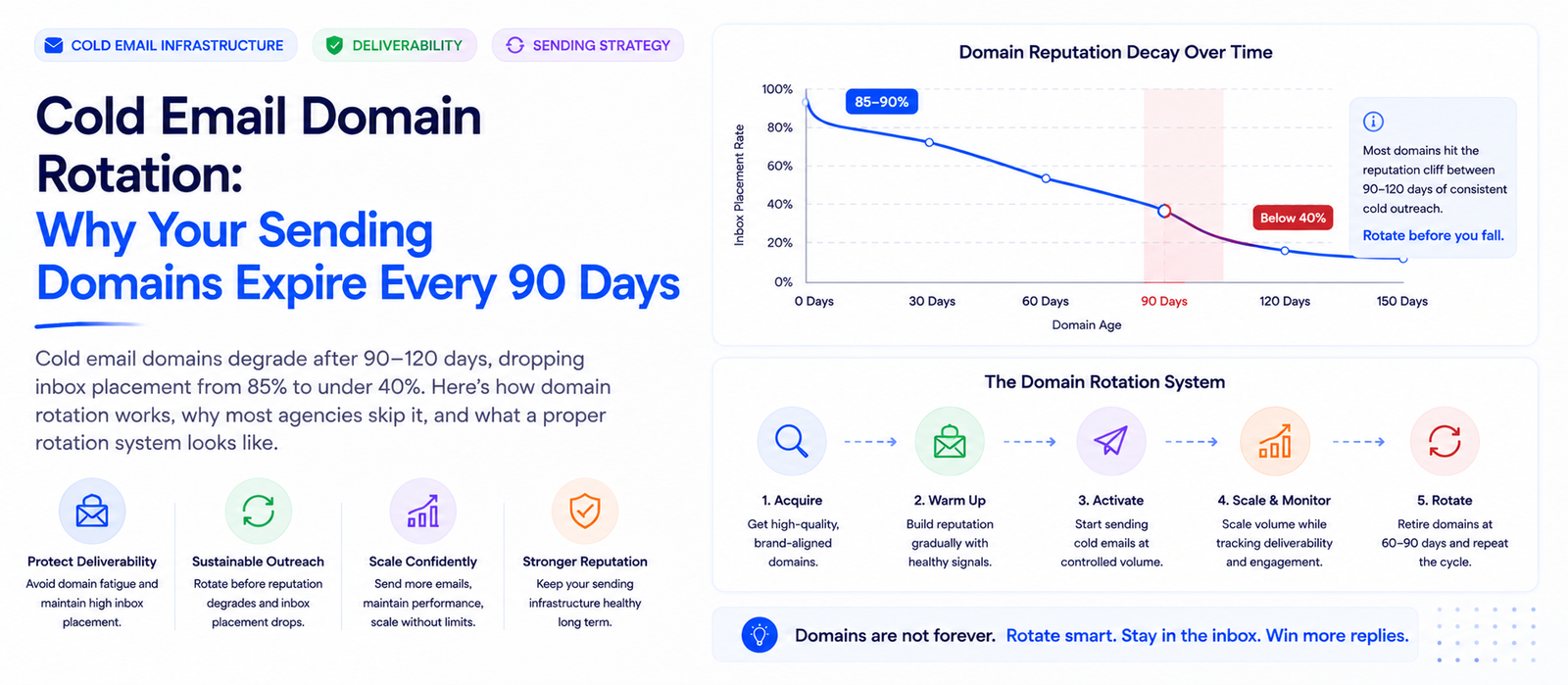
A sending domain is a depreciating asset. It has a useful life of roughly 90–120 days for cold outreach purposes. After that window, inbox providers have accumulated enough behavioral data at the domain level to permanently classify it as a commercial sales domain — and inbox placement rates collapse accordingly.
The damage is invisible until it’s catastrophic. Campaigns running on properly rotated, fresh sending infrastructure consistently generate 2–3× more replies than those running on aged domains — not because the messaging changed, but because the messages are actually arriving in the primary inbox.
How Email Providers Flag Your Sending Domain
Google, Microsoft, and other major inbox providers don’t evaluate emails in isolation. They evaluate patterns at the domain level over time. When a domain consistently sends outbound emails, it builds what’s effectively a behavioral fingerprint.
| Signal | What It Means | Impact |
|---|---|---|
| Low engagement rates | Recipients ignoring or deleting without reading | High |
| Spam complaint accumulation | “Mark as spam” clicks — even a small number compounds quickly | Critical |
| Hard bounces | Invalid or dead addresses in your contact list | High |
| Authentication record age | SPF/DKIM/DMARC history — negative history is irreversible | Medium |
| Volume-to-age ratio | High-volume sends on a relatively new domain | Medium |
The fingerprinting process is gradual but irreversible at scale. There’s no “reset” for a flagged domain — only replacement. This is why email finding and verification isn’t a nice-to-have before launching a campaign — it’s a direct infrastructure protection measure.
What Domain Degradation Actually Looks Like in the Data
The pattern is consistent across campaigns, industries, and sending tools:
By the time most teams notice something is wrong, they’ve been operating at degraded deliverability for 4–6 weeks. The pipeline impact of that window is rarely recovered.
Why Your Cold Email Agency Isn’t Rotating Domains
Domain rotation is operationally demanding. It requires:
- Purchasing new domains ahead of schedule (30+ days before they’re needed)
- Configuring DNS records (SPF, DKIM, DMARC) correctly on every new domain
- Running structured warmup sequences without triggering spam filters
- Migrating active campaigns before the 90-day threshold, not after deliverability drops
- Maintaining a rotation pool large enough that there are always fresh domains available
Agencies that don’t build systems for this find it easier to deprioritize it. The deliverability problem doesn’t announce itself immediately — it erodes slowly. There’s also a financial incentive working against you: domain rotation costs money, and agencies that operate on thin margins cut this cost and absorb the deliverability risk, because the risk lands on your pipeline, not theirs.
What a Proper Domain Rotation System Looks Like
A rotation system isn’t a reactive fix. It’s a scheduled, proactive process with no gaps in fresh infrastructure availability.
This is precisely what our email infrastructure setup service manages — domain procurement, DNS configuration, warmup sequencing, and rotation scheduling, so the infrastructure side never becomes a bottleneck for the campaign side.
The Contact List Problem That Makes This Worse
Domain rotation is necessary. But a well-rotated infrastructure running on a bad contact list will still degrade faster than it should. The two compound each other. Every hard bounce — every email sent to a dead, recycled, or invalid address — counts against the sending domain’s reputation. A list with 10–15% invalid contacts will burn through a fresh domain’s reputation in weeks, not months.
This is why contact list building and email verification are infrastructure decisions, not just list quality decisions. The same logic applies to CRM data — stale records that haven’t been touched in 12+ months are a deliverability hazard. Running CRM cleaning before any outbound campaign is how you prevent old database rot from contaminating fresh sending infrastructure.
Campaigns built from buyer intent data or hiring intent signals reach contacts who are more likely to engage — and higher engagement signals protect domain reputation more effectively than any warmup tool.
What to Do If Your Domain Is Already Flagged
If you’re reading this after deliverability has already dropped, the path forward is rotation, not remediation. There is no reliable way to “rehabilitate” a domain that inbox providers have fingerprinted. Attempts to do so — pausing sending, changing authentication records, re-warming — produce minimal improvement and waste time that could be spent on fresh infrastructure.
The correct sequence:
If you’re running cold email and LinkedIn outreach through an agency and they can’t give you a clear answer on domain ages and rotation schedule, that’s the conversation to have today — before another month of pipeline disappears into spam folders.
The One Question to Ask Every Cold Email Partner
Before signing with any cold email agency — or evaluating your current provider — ask them directly:
There are exactly two acceptable answers: a fixed calendar schedule (every 60–90 days), or a proactive rotation tied to domain age. Both indicate the provider has actually built systems for this.
If they hesitate, give a vague answer, or say they rotate “when deliverability drops” — walk away. By the time deliverability drops, the problem has already cost you 4–6 weeks of pipeline. That’s not a maintenance policy. That’s reactive damage control.
Our end-to-end B2B lead generation service operates on a fixed 90-day rotation across all client accounts by default — not because deliverability drops, but because 90 days is when it starts to.
Konnektys Team
B2B Growth & Outbound Specialists
Konnektys builds and operates outbound revenue engines for B2B companies — from ICP definition and LinkedIn prospecting to AI-powered lead research, email infrastructure, and fully managed outbound campaigns.
FAQ: Cold Email Domain Rotation Answered
What is cold email domain rotation? +
Why do cold email domains degrade after 90 days? +
What inbox placement rate should I expect from a fresh sending domain? +
How many sending domains do I need for cold email outreach? +
Can you warm up a domain and use it indefinitely? +
Does domain rotation hurt brand consistency? +
What’s the difference between domain rotation and email warmup? +
How do I know if my current sending domain is already flagged? +
What causes cold email deliverability to drop suddenly? +
How does contact list quality affect domain reputation? +
Is Your Infrastructure Costing You Pipeline?
The math on this isn’t complicated. If more than half your cold outreach is landing in spam, the problem isn’t your copy. It isn’t your targeting. It isn’t your cadence structure.
It’s that your sending domains are past their useful life and nobody told you.
Fresh domains, verified lists, and a proactive rotation calendar are what separate campaigns that generate pipeline from campaigns that generate activity reports with nothing to show for them.
- The Deliverability Problem Nobody Warns You About
- How Email Providers Flag Your Domain
- What Domain Degradation Looks Like in Data
- Why Agencies Don’t Rotate Domains
- What a Proper Rotation System Looks Like
- The Contact List Problem That Makes This Worse
- What to Do If Your Domain Is Already Flagged
- The One Question to Ask Every Cold Email Partner
- FAQ
Worried your domains are past their shelf life? Get a free infrastructure audit.
Share this article:
Related articles
Why Most B2B Companies Miss 60% of Their Market — And How to Fix It
Konnektys Team · 19 May, 2026

How to Find High-Intent B2B Leads on LinkedIn in 2 Minutes
Konnektys Team · 22 May, 2026