
Why Cold Email Results Suddenly Drop — And the 15-Day Fix That Recovers Them
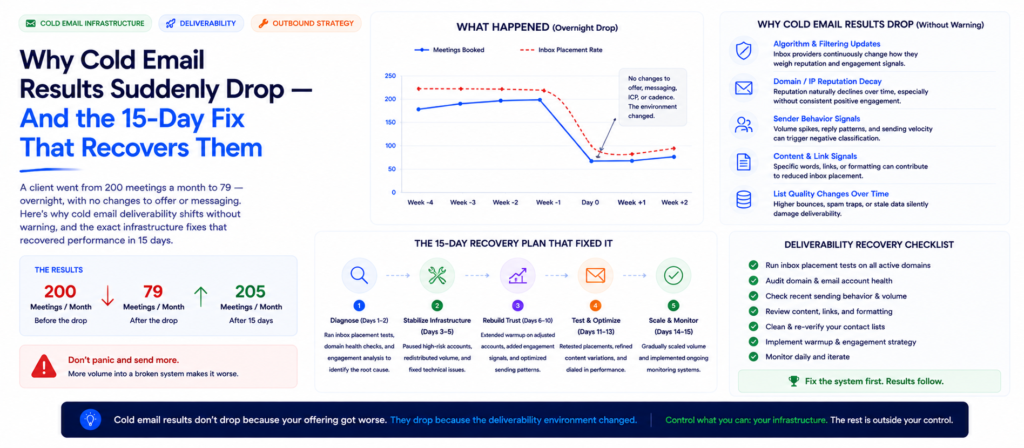
One month you’re booking meetings consistently. The next month, results fall off a cliff — same offer, same messaging, same audience. One of our clients went from nearly 200 meetings a month to 79 in a single billing cycle. The cause wasn’t the campaign. It was the deliverability environment underneath it — and it recovered in 15 days once we knew what to fix.
 Konnektys TeamJune 13, 2026 · 12 min read · Cold Email Infrastructure
If you’ve run cold email for any length of time, you’ve experienced this — or you will.
One month, the campaign is booking meetings consistently. Reply rates are stable. Pipeline is predictable. The next month, with no changes to the offer, the messaging, or the audience, performance falls off a cliff.
One of our clients was averaging close to 200 meetings per month from cold email. The campaign had been running smoothly for months — predictable pipeline, steady opportunities, nothing that suggested anything was wrong.
Then, in a single month, the same campaign produced 79 meetings. A drop of more than 60%.
The immediate questions were the obvious ones. Was the offer broken? Did the messaging stop working? Had the target market changed?
The answer to all three was no.
The deliverability environment had changed. And understanding why that happens — and what to do about it when it does — is one of the most important operational skills in running cold email at any meaningful volume.
The Reality Most Companies Don’t Understand About Cold Email
Cold email is not a static channel. It behaves like one when things are working — the same sequence keeps producing the same results, week after week, and it’s easy to assume that’s the natural state.
It isn’t. Google, Microsoft, and other major email providers continuously update their filtering systems. Their objective is straightforward: protect users from unwanted email while ensuring legitimate communication reaches the inbox. Achieving that objective requires constant adjustment — new signals get weighted differently, new patterns get flagged, thresholds shift.
The practical consequence: tactics that work today may not work the same way three to five months from now. Not because the tactics were wrong, but because the environment they were operating in has moved.
This isn’t a flaw in cold email as a channel. It’s one of its defining operational characteristics — and it’s exactly why we frame cold email as infrastructure, not just copywriting. As we cover in our domain rotation guide, sending domains have a finite useful life specifically because inbox providers continuously reassess sender reputation. Deliverability shifts are the same mechanism operating at the provider level rather than the domain level.
Successful outbound teams don’t expect conditions to remain constant. They build systems designed to detect and adapt when deliverability shifts — because it isn’t a question of whether it will happen, only when.
The companies that struggle are the ones that treat their current setup as a finished, permanent configuration. When performance drops, they don’t have a framework for diagnosing why — so they default to rewriting the campaign from scratch, which usually doesn’t address the actual cause and burns weeks in the process.
Why Deliverability Changes Happen — The Seven Signals
Email providers evaluate a combination of signals — continuously, automatically, and at scale — to decide whether a message belongs in the primary inbox, the promotions tab, or the spam folder. Understanding these signals is the foundation for understanding why performance can shift without any change to your campaign.
1. Sender reputation
A score associated with the individual sending account or mailbox — built from historical sending behaviour, engagement rates, and complaint history specific to that inbox.
2. Domain reputation
A broader score associated with the sending domain itself, accumulated across every inbox sending from that domain. This is the mechanism behind the 90-day domain shelf life we cover in our domain rotation guide — domain reputation degrades cumulatively and eventually triggers permanent classification as a commercial sender.
3. Inbox engagement
Opens, replies, and — critically — how recipients interact with messages from a given sender over time. High engagement signals legitimate communication. Low engagement, especially at volume, signals the opposite.
4. Sending volume
The number of emails sent per account, per domain, and per IP, evaluated both in absolute terms and relative to the sending history of that account. Sudden volume increases are treated with more suspicion than gradual ones.
5. Email content
The actual text, formatting, links, and structure of the message — evaluated for patterns associated with spam, promotional content, or templated mass-sending.
6. Authentication records
SPF, DKIM, and DMARC configuration — the technical foundation that proves a sending domain is authorised to send on behalf of the apparent sender. Misconfigured or absent records are an immediate red flag regardless of everything else.
7. Historical performance patterns
The accumulated sending history of the account, domain, and IP over weeks and months — not just the current campaign’s performance, but the pattern of behaviour providers have observed over time.
The critical point: when providers update how they weight or interpret these signals — which happens continuously and without announcement — sending practices that were performing well can become less effective overnight, even when nothing about the campaign itself has changed. Your copy is identical. Your targeting is identical. Your offer is identical. But the seven signals above are now being interpreted differently by the systems deciding where your email lands.
This is why cold email success is never just about copywriting. It’s also, and arguably primarily, about infrastructure — and infrastructure requires ongoing maintenance, not a one-time setup.
Six Patterns From the Latest Deliverability Shift
After monitoring campaigns across multiple industries and accounts through the most recent deliverability shift, six patterns became clear. These represent the current state of what’s working — with the explicit caveat that “current” is the operative word. The patterns themselves are evidence of the adaptive process, not a permanent ruleset.
Pattern 1: More Sending Accounts Improve Stability
Relying on a small number of inboxes creates concentration risk. When all of a campaign’s sending volume runs through two or three accounts, each account carries a disproportionate share of the reputation burden — and any single account’s degradation has an outsized impact on overall campaign performance.
Distributing sending volume across a larger pool of inboxes means each individual inbox maintains a healthier reputation profile and experiences less sending strain. The result is a more resilient system — one that can absorb deliverability fluctuations on individual accounts without producing dramatic swings in overall campaign performance.
This is the same principle behind domain rotation, applied at the inbox level: concentration is fragile, distribution is resilient. Email infrastructure setup manages exactly this — building and maintaining the right ratio of sending accounts to sending volume, so that no single inbox is carrying more reputation risk than it can sustainably handle.
Pattern 2: Warm-Up Periods Need More Time
Historically, many teams could begin scaling a new inbox to full sending capacity relatively quickly — a week or two of gradual increase and then full volume.
In the current environment, stronger performance has been observed when inboxes receive meaningfully more time in warm-up — typically an additional week beyond what was previously sufficient — before reaching full sending capacity. The extra time builds a deeper engagement history before the inbox starts carrying cold outreach load, which produces a healthier reputation baseline going into full-volume sending.
Patience during setup translates directly into better long-term results. An inbox that’s rushed to full volume in two weeks may hit early performance numbers that look fine — and then degrade faster over the following months than an inbox that took three to four weeks to ramp properly.
Pattern 3: Lower Daily Volume Continues to Win
Many organisations still operate on the assumption that higher sending volume produces proportionally better results — more emails sent equals more replies, more meetings, more pipeline.
The relationship is not linear, and in the current environment it’s often inverse beyond a certain threshold. Inboxes kept in lower sending ranges consistently show stronger deliverability than inboxes pushed toward maximum capacity. A healthy inbox sending a moderate volume with strong engagement metrics outperforms an overloaded inbox sending maximum volume with degraded metrics — even though the second inbox is technically “doing more.”
The practical implication: when diagnosing a performance drop, increasing volume to compensate is almost always the wrong instinct. It’s more likely to deepen the problem than solve it.
Pattern 4: Google Workspace Continues to Perform Well
Across the alternative sending configurations and SMTP setups that continue to evolve in the cold email space, Google Workspace remains one of the most reliable environments for cold outreach — its reputation infrastructure and consistency continue to make it a preferred foundation for outbound sending accounts.
This is not a permanent endorsement — the landscape changes, and ongoing testing across providers remains essential. But as a current baseline, Google Workspace accounts, properly configured and warmed, represent one of the more dependable starting points for cold email infrastructure.
Pattern 5: Certain Trigger Words Create Unnecessary Risk
Spam filtering has become significantly more sophisticated than simple keyword matching — but words and phrases strongly associated with promotional messaging still increase scrutiny on a message, particularly in combination with other risk signals.
Common examples: “free,” “audit,” “100%,” “guarantee,” “risk-free,” “limited-time.” This doesn’t mean these words are categorically forbidden or that using one will automatically trigger spam classification. But language that mirrors genuine business conversation — the way one professional would actually write to another — consistently produces better deliverability than language that mirrors promotional or marketing copy.
The test worth applying to every line of cold email copy: would a colleague write this sentence in a normal work email? If the answer is no, the sentence is probably increasing risk without adding persuasive value.
Pattern 6: Message Variation Matters More Than Ever
Sending identical email copy repeatedly across multiple sending accounts creates a recognisable pattern — the same text, structure, and formatting appearing across dozens or hundreds of sends from different inboxes is exactly the kind of signal that filtering systems are designed to detect.
Introducing thoughtful variation — different phrasing, different structure, different subject lines across sending accounts — helps each individual message appear more like an individual piece of communication and less like output from a templated mass-sending system.
The goal is not to “trick” spam filters through obfuscation. The goal is to communicate in a way that genuinely resembles how a human would write to multiple different people about a similar topic — which, structurally, involves variation, because humans don’t send the exact same sentence to fifty different people in the same week.
The Diagnostic Sequence: What to Check First
When results decline, the instinct is usually to assume the campaign broke — and to start rewriting copy, changing the offer, or switching the target list. In most cases, none of those are the actual cause, and changing them wastes time while the real issue continues unaddressed.
The diagnostic sequence that identifies the actual cause faster:
1
Has inbox placement changed?
Run sending domains through an inbox placement test (GlockApps, MXToolbox, or similar). If primary inbox placement has dropped compared to your baseline, this is almost certainly where the problem lives — and the answer is an infrastructure fix, not a copy fix.
2
Are reply rates declining while open rates hold steady — or are both declining together?
If opens are stable but replies dropped, the issue may be in the message or offer. If both opens and replies dropped together, the issue is almost certainly deliverability — fewer people are seeing the email at all.
3
Has sending volume increased recently?
Check whether volume per account or per domain increased around the time performance started declining. A volume increase that outpaced the infrastructure’s capacity to absorb it is one of the most common — and most overlooked — causes of sudden drops.
4
Are inboxes fully warmed?
If new sending accounts were added recently, confirm they completed a full warmup cycle before being put into full rotation. An under-warmed inbox added to the pool can drag down the performance of the accounts around it if it’s flagged.
5
Has domain reputation deteriorated?
Check domain age against the 90-day threshold. A domain that’s been in active cold sending for 90+ days without rotation is a strong candidate for the cause, independent of any other factor. See our domain rotation guide for the full diagnostic on domain-level degradation.
6
Have email providers updated filtering behaviour?
This is the hardest to verify directly, but if every other check comes back clean — placement test results look reasonable, volume hasn’t changed, warmup was proper, domains are within rotation — and performance still dropped, a provider-side filtering update is the remaining explanation. The fix is adaptation: testing more sending accounts, longer warmup, lower volume, and message variation to find the configuration that performs well under the updated rules.
This sequence usually surfaces the actual cause within hours, not weeks — and it consistently points toward an infrastructure or sending-pattern adjustment rather than a campaign rewrite.
The 15-Day Recovery Timeline
In the case of the client who dropped from nearly 200 meetings to 79, recovery to previous performance levels took approximately 15 days. Here’s what that recovery actually involved — and what it didn’t.
What it didn’t need: a new offer, a new audience, or new messaging written from scratch. The fundamentals of the campaign — who it targeted, what it offered, how it was positioned — were not the problem, and changing any of them would have been solving for the wrong variable.
What it did need: an infrastructure strategy realigned with the current deliverability environment. In practice, this meant:
Diagnosis. Running the diagnostic sequence above — inbox placement testing across all active sending accounts and domains, reviewing recent volume changes, checking domain ages against the rotation schedule, and confirming authentication records were correctly configured.
Infrastructure adjustment. Based on the diagnosis, implementing the relevant pattern shifts — distributing volume across additional sending accounts, reducing daily volume per inbox to a more conservative range, and beginning warmup on any new accounts being added to the pool.
Extended warmup and gradual reintroduction. New or adjusted sending accounts went through a properly extended warmup period before being brought into full rotation — resisting the temptation to rush this step in order to restore volume faster.
Performance stabilisation and monitoring. As adjusted infrastructure came online and warmup completed, inbox placement rates returned to baseline, and meeting bookings climbed back toward the previous run rate.
The total elapsed time — 15 days — is notably shorter than the time it would have taken to write, test, and iterate on an entirely new campaign from scratch, with no guarantee that a new campaign would have addressed an infrastructure problem anyway. Diagnosing correctly the first time is the single highest-leverage step in the entire recovery process.
Building a System That Adapts Instead of Breaking
The companies that consistently generate meetings from cold email over long periods aren’t the ones running a “perfect” campaign that never needs adjustment. They’re the ones that built a system capable of detecting when something has changed and adapting quickly.
Continuous inbox placement monitoring
Not a one-time check at campaign launch, but an ongoing measurement that establishes a baseline and flags deviations from it. Without a baseline, a drop from 85% to 60% placement looks like noise. With a baseline, it’s an immediate, actionable signal.
A sending account pool sized for resilience, not just current volume. If your current volume requires exactly the number of sending accounts you have, there’s no buffer for rotation, no room to add warmup-stage accounts without disrupting active sending, and no resilience if one or two accounts degrade simultaneously. Email infrastructure setup builds this buffer in from the start — sizing the sending account pool with headroom for rotation and degradation, not just for the volume target.
A rotation calendar that runs independently of performance. As covered in our domain rotation guide, the rotation trigger should be calendar-based — a fixed 90-day schedule — not performance-based. Waiting for a drop before rotating means you’ve already lost weeks of pipeline by the time the rotation happens.
A list verification cadence that prevents bounce-driven reputation damage from compounding with provider-side shifts. When a deliverability shift coincides with elevated bounce rates from an unverified list, the two factors compound — making diagnosis harder and recovery slower. Email finding and verification keeps bounce rates in the healthy range independent of what’s happening at the provider level, so that if a deliverability shift does occur, it’s the only variable that needs to be diagnosed.
Message variation built into the sequence design from the start, rather than retrofitted after a drop. Multiple subject line and copy variants per sequence, distributed across sending accounts, mean the campaign already has the variation that Pattern 6 describes — without needing an emergency rewrite when performance drops.
A documented diagnostic process — the sequence described above, written down, so that when performance drops, the team runs through a known checklist rather than guessing. The 15-day recovery in this case study was fast specifically because the cause was correctly diagnosed quickly. Teams without a diagnostic process often spend the first week of a drop guessing at causes that aren’t the actual issue.
End-to-end B2B lead generation operates with all of these systems built in by default — continuous monitoring, sized infrastructure, calendar-based rotation, ongoing verification, and a documented diagnostic process — so that deliverability shifts are detected and addressed as routine maintenance rather than emergencies.
What This Means for Campaigns That Haven’t Dropped Yet
If your cold email campaign is currently performing well, the patterns in this post are not just a recovery playbook — they’re a prevention checklist.
Audit your sending account distribution now
How many sending accounts are carrying your current volume? If the answer is “as few as possible,” you’re carrying more concentration risk than necessary. Distributing volume across more accounts now is cheaper than recovering from a drop later.
Check your domain ages against the 90-day threshold now
If any active sending domain is approaching or past 90 days of cold sending, it’s a candidate for rotation regardless of current performance — because by the time performance drops, the rotation is already overdue.
Review your daily volume per inbox
If volume has crept upward over time — more accounts added to a sequence, more campaigns running through the same infrastructure — check whether per-inbox volume is still in a conservative range, or whether it’s drifted toward the aggressive end where Pattern 3 applies.
Establish a baseline for inbox placement now
A baseline measured during a good period is the reference point that makes a future drop immediately diagnosable. Without it, you’re trying to identify a deviation from a starting point you never measured.
Build message variation into current sequences
Not as an emergency response but as standard practice. If a deliverability shift happens to a campaign that already has variation built in, that variable is already handled — leaving fewer things to diagnose and adjust.
The companies that recover fastest from deliverability shifts are, in most cases, the companies that were already operating close to the patterns described in this post before the shift happened. The shift still affects them — but the gap between “before” and “after” is smaller, because their baseline was already closer to what the new environment rewards.
FAQ: Cold Email Deliverability Drops Answered
Why did my cold email results suddenly drop with no changes to my campaign?
+
How do I know if a performance drop is deliverability versus the campaign itself?
+
How long does it take to recover from a cold email deliverability drop?
+
Should I increase sending volume to compensate for a drop in meetings?
+
Why does Google Workspace perform well for cold email?
+
Are certain words automatically flagged by spam filters?
+
Why does sending the same email from multiple accounts hurt deliverability?
+
How often should I check my cold email deliverability?
+
What’s the difference between a deliverability drop and a domain reputation problem?
+
How can I prevent sudden deliverability drops from affecting my pipeline this badly in the future?
+
The Bottom Line
Cold email is still one of the most effective channels for generating qualified B2B conversations. But cold email success requires more than writing good emails — it requires monitoring deliverability, maintaining healthy infrastructure, warming inboxes properly, and adapting when providers change the rules.
If your results suddenly decline, don’t assume cold email is broken. Don’t rewrite the campaign from scratch. Run the diagnostic sequence first.
More often than not, the environment has changed — not the campaign. And the teams that recognise that first are the ones that recover in 15 days instead of losing a full quarter rebuilding something that wasn’t broken.
Konnektys Builds Cold Email Infrastructure Designed to Adapt
Email infrastructure setup with domain rotation and sending account pools sized for resilience, contact list verification to keep bounce rates healthy, and fully managed cold email and LinkedIn outreach with continuous deliverability monitoring built in.
- The Reality Most Companies Don’t Understand About Cold Email
- Why Deliverability Changes Happen — The Seven Signals
- Six Patterns From the Latest Deliverability Shift
- The Diagnostic Sequence: What to Check First
- The 15-Day Recovery Timeline
- Building a System That Adapts Instead of Breaking
- What This Means for Campaigns That Haven’t Dropped Yet
- FAQ: Cold Email Deliverability Drops Answered
- The Bottom Line
Worried your deliverability could be quietly degrading? We’ll audit your infrastructure and build the monitoring and rotation systems to catch it before it costs you pipeline.
Talk to Konnektys →Related articles
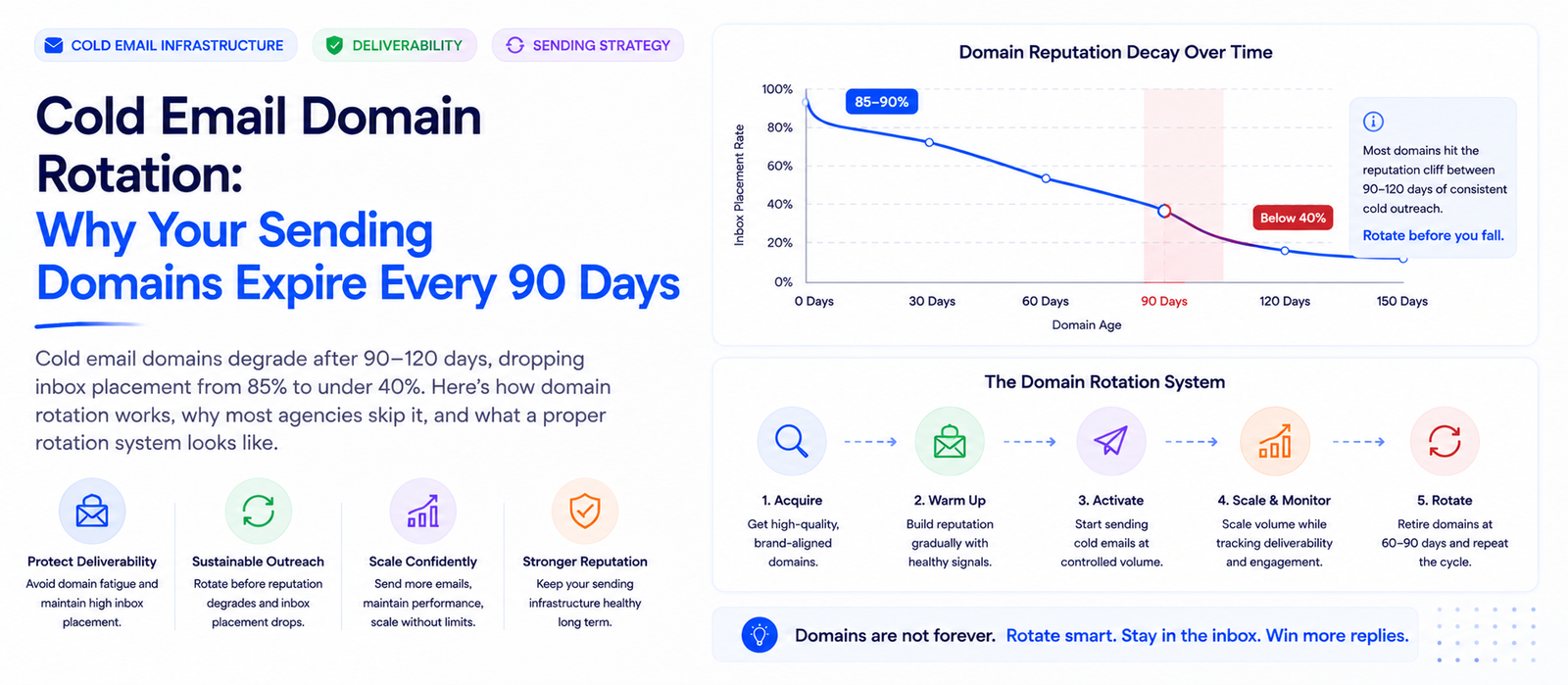
The 90-Day Domain Rotation Guide for Cold Email
Konnektys Team · 19 May, 2026
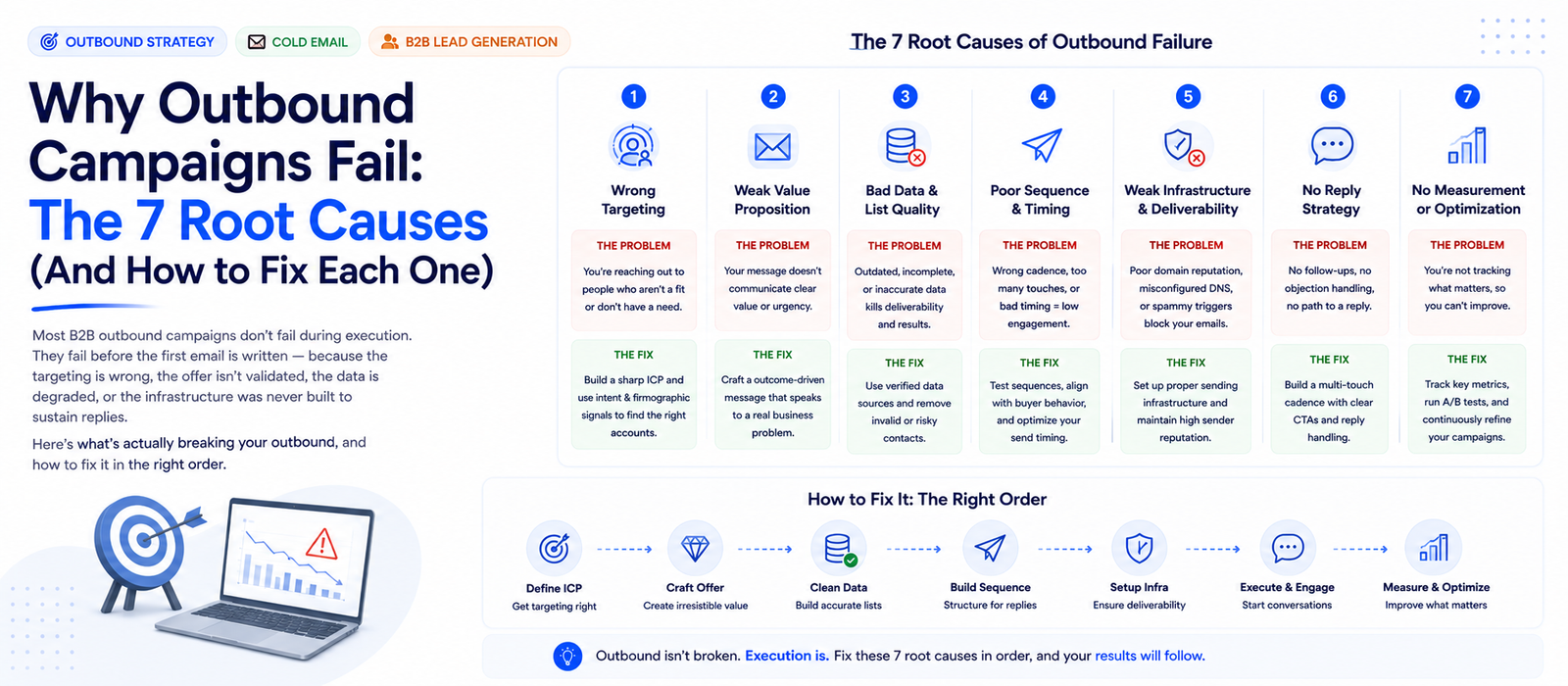
Why Outbound Campaigns Fail: The 7 Root Causes (And How to Fix Each One)
Konnektys Team · 7 Jun, 2026